LangGraph Checkpoints for Human Approval Gates
A practical recipe for adding approval gates to LangGraph agents with checkpoints, interrupts, and resumable tool execution.
LangGraph Checkpoints for Human Approval Gates
Some agent actions should not run on autopilot. Creating a pull request is fine. Force-pushing a branch, spending cloud budget, emailing customers, or deleting records needs a stop sign. The useful pattern is not “human in the loop” as a slogan. It is a small state machine that can pause before a risky tool call, persist enough context, ask for approval, then resume without losing the thread.
LangGraph is a good fit for this pattern because it treats an agent as a graph of nodes and edges, with state passed between steps. Its persistence model lets a graph checkpoint state for a thread, then continue later. That gives builders a clean way to design approval gates instead of hiding them inside prompt text.
When to add an approval gate
Do not put approval in front of every tool. That makes the agent slow and trains reviewers to rubber-stamp. Gate actions with high blast radius or weak reversibility.
Good approval candidates:
- writes to production data
- external messages to users, customers, or vendors
- cloud actions that create spend or change infrastructure
- repository actions such as merge, force push, release, or tag
- security-sensitive actions such as rotating keys or changing permissions
Usually safe without approval:
- reading documentation
- searching code
- running local tests
- creating a draft artifact
- proposing a patch without applying it
The design goal: let the agent do cheap thinking and reversible work alone, then ask before irreversible work.
Minimal graph shape
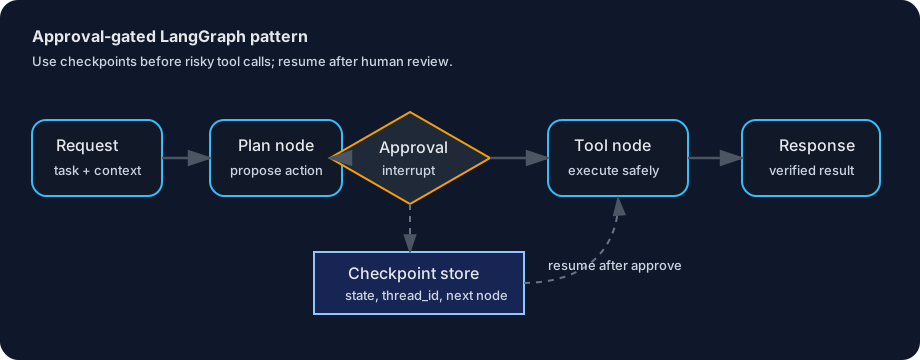
A practical approval graph has five parts:
| Part | Purpose | Output |
|---|---|---|
| Intake node | Normalize user request and inputs | Structured task state |
| Plan node | Decide next action and tool arguments | Proposed action |
| Approval gate | Pause if action is risky | Approval request |
| Tool node | Execute approved action | Tool result |
| Verify node | Check result and summarize | Final response |
The important boundary is between “propose” and “execute.” The agent should produce a concrete action for review: tool name, arguments, target resource, expected effect, rollback option, and why the action is needed. Reviewers should not approve vague text like “update infrastructure.” They should approve a specific operation.
State to persist
Checkpointing works best when state is explicit. Keep the graph state small, serializable, and reviewable.
Example state shape:
from typing import TypedDict, Literal

class AgentState(TypedDict):
    task: str
    thread_id: str
    risk_level: Literal["low", "medium", "high"]
    proposed_tool: str | None
    proposed_args: dict | None
    approval_status: Literal["not_required", "pending", "approved", "rejected"]
    tool_result: dict | None
    final_summary: str | None
This state gives the graph enough information to pause and resume. It also gives the reviewer a compact audit record. Avoid storing giant logs or raw secrets in state. Store references, paths, IDs, and redacted summaries instead.
Recipe: approval before tool execution
- Classify risk in code, not only in prompts. Use deterministic rules for known risky tools. For example,
send_email,deploy_service, andmerge_prcan require approval by default. - Generate a proposed action. The plan node fills
proposed_toolandproposed_args, but does not call the tool. - Checkpoint before the gate. Persist state using the graph checkpointer for the current thread.
- Interrupt for approval. Return an approval request to the UI, chat, or ticket system. Include exact arguments and expected side effects.
- Resume with a decision. If approved, continue to the tool node. If rejected, route to a revise or stop node.
- Verify after execution. The tool node should return evidence: command output, API response ID, diff summary, or resource URL.
- Record the decision. Keep approver, timestamp, decision, and instruction outside the prompt transcript where possible.
Approval request format
A clear approval request is short and structured:
Action: merge_pr
Target: repo=acme/api, pr=142
Reason: tests passed and reviewer requested merge
Expected effect: main branch receives 3 commits
Rollback: revert merge commit
Approve: approve thread abc123
Reject: reject thread abc123: explain reason
This format is boring on purpose. It reduces ambiguity. It also makes approvals searchable later.
Common mistakes
- Prompt-only gates. “Ask before doing dangerous things” in the system prompt is not enough. Route risky tools through graph logic.
- Approval after execution. A summary after a destructive tool call is not approval. Put the gate before the tool node.
- Hidden arguments. Reviewers need the exact resource and arguments, not a natural-language paraphrase.
- No resume ID. Approval needs a stable
thread_idor equivalent handle. Otherwise the system cannot safely continue the right run. - Over-gating. If every step requires approval, the agent becomes a manual checklist with extra latency.
Builder checklist
Before shipping an approval-gated LangGraph agent, verify:
- [ ] risky tools are listed in code
- [ ] state includes proposed tool and arguments
- [ ] checkpointing is enabled per thread
- [ ] approval request shows side effects and rollback
- [ ] rejection has a route, not just an error
- [ ] execution returns verifiable evidence
- [ ] approvals are logged outside model-generated text
The payoff is simple: agents can keep autonomy for exploration, drafting, testing, and analysis, while humans stay responsible for high-impact actions. That is the practical middle ground for production agent systems: fast where mistakes are cheap, careful where mistakes are expensive.