GitHub Connector Checklist for Code-Review Agents
A practical checklist for wiring a code-review agent to GitHub with scoped permissions, webhook handling, review comments, check runs, and approval gates.
GitHub Connector Checklist for Code-Review Agents
A code-review agent is only as safe as its connector. The model can be careful, but the connector decides what repository data the agent can read, what actions it can take, and which events wake it up. Treat the GitHub integration as production infrastructure, not plumbing.
This checklist focuses on GitHub App style connectors because they give you scoped permissions, webhook delivery, and installation-level access. The same design ideas apply if you start with a personal token during a prototype, but do not ship a shared review agent that depends on one broad human token.
What the connector should do
A useful review connector has four jobs:
| Job | Practical output | Risk if skipped |
|---|---|---|
| Receive PR events | Queue review jobs when a pull request opens, updates, or synchronizes | Agent runs stale or misses changed code |
| Read context | Fetch diff, files, comments, config, and relevant repository metadata | Agent guesses from partial input |
| Write review results | Post inline comments, summary comments, or check runs | Feedback lands in the wrong place |
| Enforce gates | Pause before write-heavy or irreversible actions | Agent can mutate code without owner intent |
Keep those jobs separate in code. Webhook handling should not run the model inline. API-writing code should not decide policy. Approval logic should not be hidden inside prompt text.
Minimal architecture
Use a small pipeline:
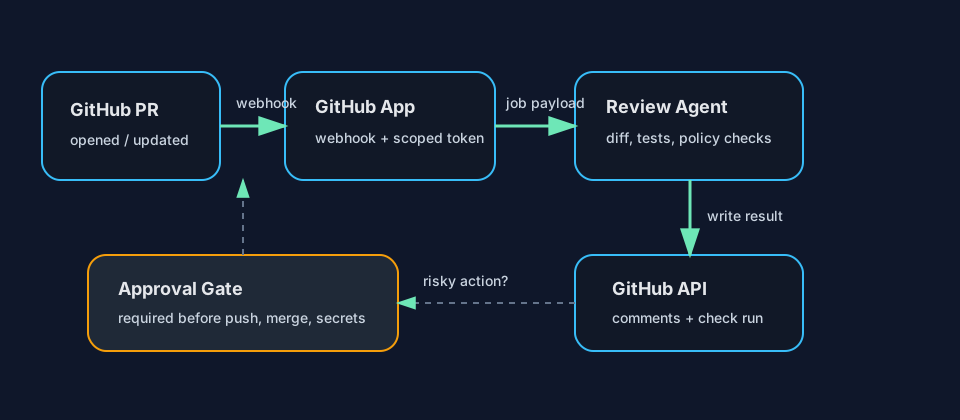
- Webhook receiver verifies the event, extracts repository, pull request, installation, and delivery IDs, then writes a job to a queue.
- Review worker fetches the PR diff and repository rules, runs the agent, and produces a structured review result.
- GitHub writer posts pull request review comments or creates a check run with pass/fail status and a summary.
- Approval gate blocks risky operations such as pushing commits, requesting auto-merge, changing labels used by release automation, or touching secrets.
This shape makes retries boring. If GitHub redelivers a webhook, you can deduplicate with the delivery ID or a job key like repo:pull_number:head_sha. If the model fails, the worker can retry without posting duplicate comments. If the writer fails, the review result can stay in storage until GitHub is reachable again.
Permissions checklist
Start with the least access that lets the agent review code:
- Pull requests: read/write if the agent posts review comments through pull request review APIs.
- Contents: read if it needs file content beyond the diff.
- Checks: read/write if it reports status through check runs.
- Metadata: read is generally part of GitHub App access and useful for repository identification.
- Issues: read/write only if the workflow posts issue comments, because pull requests are issues in parts of the GitHub API.
Avoid granting broad write permissions because “the agent might need them later.” Add permissions when a concrete workflow requires them, and put new write paths behind an approval gate first.
Comment strategy
Inline comments are best for specific defects: wrong API use, missing test coverage near changed lines, unsafe migration behavior, or concurrency problems. Summary comments are better for architectural notes and tradeoffs. Check runs are best for machine-readable status: pass, fail, skipped, timed out, or needs approval.
Use a simple rule:
- Inline comment when the feedback maps to a changed file and line.
- Summary comment when the feedback explains review scope, assumptions, or cross-file concerns.
- Check run when CI or branch protection needs a status signal.
Do not post every thought. A noisy review bot trains developers to ignore it. Cap comments, group related findings, and include confidence or evidence when the issue is not obvious.
Approval gates that matter
Most code-review agents can run fully unattended when they only read code and post comments. Gates become important when the connector can mutate repository state.
Require approval before the agent can:
- Push commits or apply patches to a branch.
- Merge, enable auto-merge, or update branch protection-adjacent labels.
- Edit workflow files, dependency lockfiles, deployment manifests, or secrets-related paths.
- Trigger expensive external jobs.
- Comment as if it represents a human reviewer.
The gate should show the proposed action, target repository, pull request, exact diff or API call, and reason. Store the approval decision with the same job ID so the worker can resume deterministically.
Practical payload shape
Keep the agent input explicit. Avoid handing it a raw webhook blob and hoping prompt instructions sort it out.
{
  "repo": "org/service",
  "pull_number": 42,
  "head_sha": "abc123",
  "event": "pull_request.synchronize",
  "changed_files": ["api/orders.py", "tests/test_orders.py"],
  "allowed_actions": ["comment", "set_check_run"],
  "requires_approval_for": ["push", "merge", "workflow_change"]
}
That payload gives the model and the surrounding code the same contract. The connector enforces allowed_actions; the prompt explains how to use them; tests verify the writer refuses anything else.
Test before you trust it
Before installing the connector broadly, test these cases:
- Webhook redelivery does not create duplicate reviews.
- Force-push to a PR cancels or supersedes work for the old SHA.
- The agent can read only repositories where the app is installed.
- A failed model call produces a neutral check run, not a fake success.
- Inline comments target valid diff lines.
- Approval is required for every mutation beyond comments and check runs.
The goal is not to make the agent timid. The goal is to make the connector predictable. Developers should know when it runs, what it can see, what it can change, and how to stop it. That trust comes from small permissions, clear outputs, idempotent jobs, and approval gates where repository state can change.