Design Agent Memory Without Building a Junk Drawer
A practical guide to designing agent memory: what to store, what to forget, how to retrieve context, and how to keep memory auditable in production systems.
Design Agent Memory Without Building a Junk Drawer
Agent memory sounds simple: save useful context, load it later, and let the agent behave more consistently. In practice, memory often becomes a junk drawer. Old preferences, stale facts, partial task notes, failed assumptions, and tool outputs all get mixed together. Retrieval then gives the agent more text, but not more judgment.
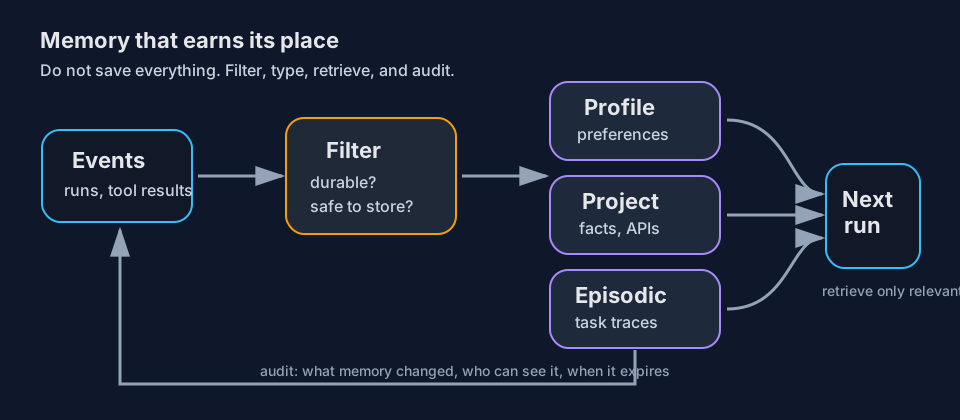
Good memory design starts with one rule: memory must earn its place. If a fact will not help future runs, should not survive for long, or cannot be safely shared with the next task, do not store it as memory. Keep it in the run trace instead.
Memory is not the transcript
A transcript records what happened. Memory changes what the agent will see next time. That makes memory more powerful and more dangerous.
Treat these as separate layers:
| Layer | Purpose | Example |
|---|---|---|
| Run trace | Debug one task | Tool calls, observations, retries, errors |
| Session state | Continue current task | Current plan, temporary IDs, open files |
| Durable memory | Improve future tasks | User preferences, stable project conventions |
| Knowledge base | Search external facts | Docs, tickets, notes, code snippets |
Most data belongs in traces, not durable memory. A trace can be inspected later without automatically influencing the next run. Durable memory should be small, typed, and reviewed.
Three useful memory types
For builder-facing agent systems, start with three buckets.
1. Profile memory
Profile memory describes stable user or team preferences.
Good examples:
- “User prefers concise answers.”
- “Team uses GitHub issues for bug intake.”
- “Approval required before production deploys.”
Bad examples:
- “User asked about billing yesterday.”
- “PR 417 fixed authentication.”
- “Always run this exact command.”
Profile memory should change rarely. If it changes often, it is probably task state.
2. Project memory
Project memory captures durable facts about a workspace.
Examples:
- service names
- test command conventions
- deployment environments
- API quirks that repeatedly matter
- coding style decisions not obvious from the repo
Keep project memory close to the project boundary. A fact about one repository should not leak into another repository unless it is explicitly global.
3. Episodic memory
Episodic memory stores summarized experience from prior tasks. This is useful for “we tried this before” cases, but it is also where clutter grows fastest.
Use episodic memory only when the lesson is reusable:
- a recurring failure mode
- a migration gotcha
- a vendor API behavior confirmed by docs or tests
- a debugging path that saved time
Do not store every completed task. Completed work becomes stale quickly.
Add a memory gate
Never let an agent write durable memory directly from raw conversation. Add a gate that asks four questions before storage:
- Durability: Will this still matter in 30 days?
- Scope: Is this user-level, project-level, or task-only?
- Safety: Does it contain secrets, personal data, private customer content, or sensitive output?
- Evidence: Was it provided by the user, verified by tools, or inferred weakly?
If the answer is unclear, store nothing. For high-impact memory, ask for approval in interactive systems. For autonomous jobs, prefer conservative non-storage.
A simple memory candidate schema helps:
{
  "text": "Project uses pytest with xdist for parallel tests.",
  "type": "project",
  "scope": "repo:payments-api",
  "source": "verified_command_output",
  "expires_at": null
}
The schema matters less than the habit: every memory needs type, scope, source, and lifetime.
Retrieve less than you store
Even good memory can hurt if every item is injected into every prompt. Retrieval should be selective.
Use a two-step pattern:
- Search by task, project, user, and tool context.
- Rerank or filter for direct relevance before prompt injection.
For example, a coding agent fixing a test failure may need project test conventions and recent debugging lessons. It does not need the user’s writing style preferences. A calendar agent may need timezone preference, but not repository deployment notes.
Prompt memory as facts, not commands. This reduces accidental override of the current instruction.
Prefer:
Known project fact: The API service uses pytest with xdist.Avoid:
Always run pytest -n auto before answering.The second version turns memory into a standing order. Standing orders should be rare and explicit.
Make memory auditable
Production agents need a memory changelog. At minimum, record:
- who or what created the memory
- timestamp
- source run or message
- previous value if edited
- scope
- expiration
- deletion reason
This gives operators a way to answer: “Why did the agent think that?” It also makes memory cleanup practical. Without auditability, memory bugs become ghost stories.
Add user controls when possible:
- show stored memory
- edit a memory
- delete a memory
- disable memory for a task
- mark a task as private or non-learning
Memory should feel like configuration, not surveillance.
Production checklist
Before shipping agent memory, check:
- [ ] Raw transcripts are not automatically promoted to durable memory.
- [ ] Memory has type, scope, source, and lifetime.
- [ ] Secrets and sensitive data are blocked from storage.
- [ ] Retrieval is task-specific, not “load everything.”
- [ ] Current instructions outrank memory.
- [ ] Users or operators can inspect and delete memory.
- [ ] Eval cases include stale, conflicting, and malicious memory.
- [ ] Memory changes appear in traces or audit logs.
Start small
The safest first version is not a vector database full of every interaction. It is a small set of explicit, durable facts plus searchable traces for debugging.
Store less. Label better. Retrieve only what the task needs. Then test memory like any other production feature: with regressions, permissions, and failure cases. Agent memory is useful when it helps the system remember stable context without forgetting its boundaries.