Build a Skill Library Before You Add More Tools
A practical guide to designing reusable agent skills: when to create them, what to include, how they differ from tools, and how to keep them from becoming stale prompt clutter.
Build a Skill Library Before You Add More Tools
Most agent projects start by adding tools: a shell, a browser, a database connector, a ticketing API, a code editor. Tools matter, but they do not tell the agent how your team works. Without that procedure layer, the agent can call the right API in the wrong order, skip verification, or repeat a mistake that someone already debugged last week.
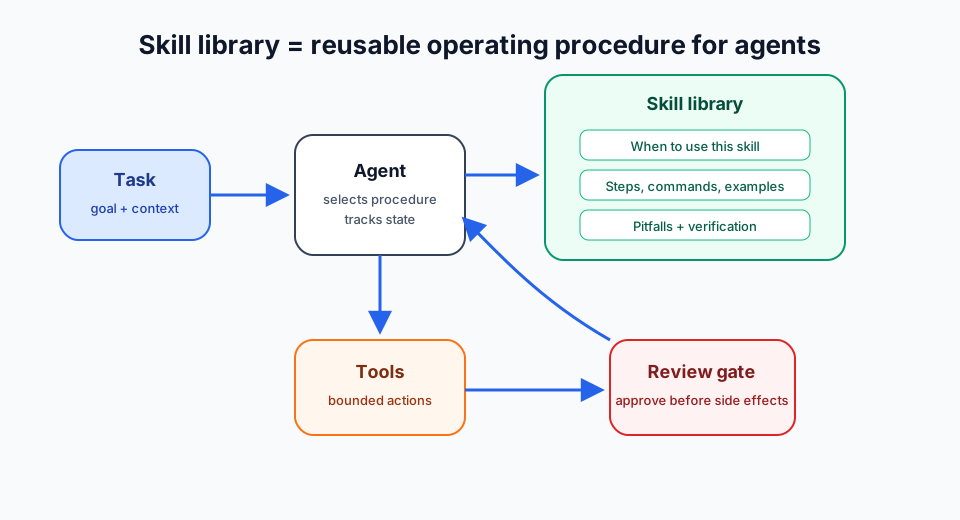
A skill library is that procedure layer. It is a collection of reusable instructions that describe when to use a workflow, what steps to follow, which commands are safe, what failures to expect, and how to verify completion.
Skill, tool, memory, connector: quick separation
| Layer | Purpose | Example | Failure if missing |
|---|---|---|---|
| Tool | Performs an action | git, browser, database client, MCP tool | Agent cannot execute work |
| Connector | Exposes a system boundary | GitHub, Notion, Slack, internal API | Agent cannot reach system data |
| Memory | Stores durable facts | Team style, repo convention, user preference | Agent repeats discovery |
| Skill | Stores reusable procedure | "Review a PR", "deploy static site", "triage incident" | Agent acts without operating discipline |
The Model Context Protocol specification separates server capabilities such as tools and resources. Tools are model-callable functions; resources expose context. A skill sits above both: it tells the agent how to combine context and actions into a safe workflow.
When to create a skill
Do not turn every note into a skill. Create one when the procedure is likely to repeat and has enough detail to prevent mistakes.
Good triggers:
- A task took five or more steps and will happen again.
- The agent had to recover from a non-obvious error.
- A human corrected the agent's process, not only the answer.
- A workflow has approval gates, security boundaries, or deployment risk.
- Several tools must be used in a specific order.
Poor triggers:
- One-off facts that belong in task context.
- Temporary project status that will be stale in a week.
- Generic advice like "write clean code".
- Product claims copied from memory without source links.
A useful rule: memory remembers facts; skills remember methods.
Anatomy of a useful skill
A production-ready skill should be short enough to read, but specific enough to change behavior. Use this structure:
- Trigger conditions — when the agent must load the skill.
- Inputs needed — repository path, environment, credentials, ticket ID, target URL.
- Procedure — ordered steps, not vague principles.
- Commands or API examples — exact invocations where possible.
- Pitfalls — known failure modes and how to detect them.
- Verification — what must be true before the agent reports success.
- Update rule — when to patch the skill after discovering a gap.
Here is a minimal template:
# Skill: Review a Small Pull Request

## Use when
- User asks for PR review before merge.
- Diff is under 1,000 lines or scoped to one feature.

## Steps
1. Inspect branch, diff, and changed files.
2. Run existing tests related to changed code.
3. Check security-sensitive paths first.
4. Report only actionable findings.
5. If no findings, say what was checked.

## Pitfalls
- Do not infer test results. Run them or say they were not run.
- Do not review generated files unless they affect behavior.

## Verification
- Diff inspected.
- Test command output captured.
- Findings include file and line where possible.
The format is plain, but the behavior change is large. The agent now has a reusable standard instead of improvising each time.
Keep skills close to work
A skill library fails when it becomes a dusty prompt dump. Keep skills close to the workflows they govern.
For code agents, store skills in the repository or agent profile that runs the repo. For operations agents, tie skills to runbooks and deployment paths. For product agents, link skills to source-of-truth docs and approval rules.
Avoid global skills for local quirks. A command that works on one VPS may be dangerous on another. A connector convention for one workspace may leak data in a different workspace. Scope is part of safety.
Teach the agent to patch skills
The best time to improve a skill is immediately after a failure. If the agent discovers that a deploy command times out but still completes, the skill should say that timeouts are ambiguous and list the verification steps. If an API blocks default user agents, the skill should mention the working curl flags. If a test suite needs a service started first, the skill should include that prerequisite.
This turns incidents into reusable operating knowledge.
Use this update loop:
- Run workflow.
- Hit failure or correction.
- Fix task.
- Patch skill with the smallest durable lesson.
- Verify the skill still reads like procedure, not a session log.
Do not save completed task IDs, PR numbers, or temporary progress. Those belong in logs, not skills.
Example: skill-driven connector work
Suppose your agent maintains a GitHub-to-Linear triage flow. Tools can list issues, create comments, and update tickets. The skill defines the human policy:
- Never close a customer-reported issue without human approval.
- Summarize duplicates before linking them.
- Add severity only from the team's rubric.
- Verify the Linear issue exists before commenting on GitHub.
- If API rate limits appear, stop and report queued work.
That skill prevents tool access from becoming uncontrolled automation. The agent can still work quickly, but it follows team rules.
Practical checklist
Before adding another tool, ask:
- What repeated workflow will this tool support?
- What order should calls happen in?
- What context must be loaded first?
- What side effects need approval?
- What output proves the task succeeded?
- What errors have humans already solved?
- Where should this procedure live so the right agent sees it?
If you cannot answer those questions, the next improvement is probably not another connector. It is a skill.
Bottom line
Tools give agents hands. Skills give them operating discipline. Build the skill library early, keep it scoped, and patch it after real failures. That is how an agent stops being a clever demo and starts becoming a dependable teammate for developer workflows.