MCP Resources vs Tools: Keep Read Paths Separate from Action Paths
A practical foundation for designing MCP integrations by separating read-only resources from action-oriented tools.
MCP Resources vs Tools: Keep Read Paths Separate from Action Paths
When builders first wire an agent to Model Context Protocol, the tempting move is to expose one powerful tool: read_or_write_anything. It feels flexible. It also blurs the most important boundary in an agent system: reading context is not the same as taking action.
MCP gives you separate primitives for separate jobs. Resources expose context the model can inspect. Tools expose operations the model can request. Prompts package reusable interaction templates. This post focuses on the first two because they shape safety, reliability, and debuggability.
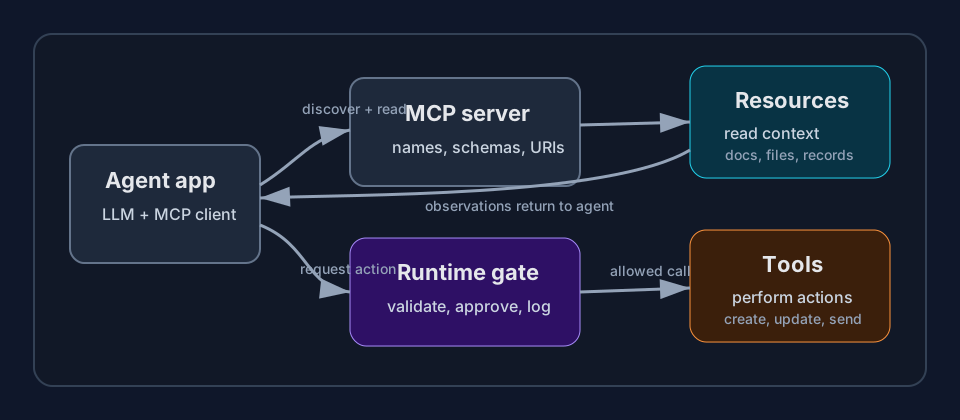
Mental model
Use this rule first:
| MCP primitive | Best for | Risk level | Example |
|---|---|---|---|
| Resource | Read-only context | Lower | repo://README.md, ticket://123, customer://profile/42 |
| Tool | Intentional operation | Higher | create_issue, summarize_file, send_invoice_draft |
| Prompt | Reusable instruction pattern | Depends | review_pr_prompt, write_release_notes_prompt |
A resource should answer, “What can the agent look at?” A tool should answer, “What can the agent ask the system to do?”
That distinction matters even when both touch same backend. Reading a ticket and updating a ticket are different trust decisions. Fetching a file and deleting a file are different failure modes. Listing invoices and sending invoice reminders are different compliance conversations.
Why not make everything a tool?
You can model reads as tools. Many systems do. But if every operation is a tool, you lose useful structure:
- Permission reviews become harder because harmless reads sit beside dangerous writes.
- Logs become noisy because context gathering looks like action taking.
- UI becomes confusing because user approval may appear for normal reading.
- Evals become weaker because success traces do not show whether agent separated research from side effects.
- Future clients cannot easily prefetch or display context as context.
Resources give your integration a calmer read path. The agent can inspect docs, records, snippets, or state without asking for broad mutation rights. Tools then stay focused on actions that deserve validation, rate limits, approvals, and stronger audit logs.
Design resources around stable nouns
Good resources usually map to nouns in your system:
repo://owner/name/path/to/fileissue://project/key-123runbook://service/deploycustomer://account/123/profilemetric://service/api/latency/p95
Avoid turning resources into mini command languages. A resource URI should identify context, not smuggle arbitrary queries. If you need search, expose a narrow search tool or a resource template with clear parameters.
Resource output should be useful but bounded. Include enough metadata for the model to reason about freshness and scope:
{
  "uri": "issue://checkout/BUG-123",
  "mimeType": "application/json",
  "text": "{\"title\":\"Payment retry fails\",\"status\":\"open\",\"updated_at\":\"2026-05-20\"}"
}
For large systems, do not dump everything. Return summaries, pagination hints, or links to narrower resources. Context windows are still finite, and agents make worse decisions when you flood them.
Design tools around explicit intent
Tools should be verbs with constrained inputs. Prefer this:
{
  "name": "create_bug_issue",
  "description": "Create a new bug issue in one allowed project.",
  "inputSchema": {
    "type": "object",
    "properties": {
      "project_key": { "type": "string", "enum": ["WEB", "API"] },
      "title": { "type": "string", "maxLength": 120 },
      "reproduction_steps": { "type": "array", "items": { "type": "string" } }
    },
    "required": ["project_key", "title", "reproduction_steps"]
  }
}
Avoid this:
{
  "name": "jira_api",
  "description": "Call Jira API with arbitrary method, path, and body."
}
The second tool pushes too much responsibility into model reasoning. The runtime should carry boring but critical controls: schema validation, allowlists, idempotency keys, permission checks, approval gates, and structured error messages.
Practical workflow for new MCP integration
Use this sequence before writing server code:
- List nouns. What context does agent need to read? Docs, tickets, files, database rows, metrics, calendars.
- List verbs. What actions may agent request? Create, update, send, comment, schedule, deploy.
- Mark risk. Separate no-side-effect reads from side-effect actions.
- Define resources first. Give each important noun a URI shape, MIME type, size limit, and freshness metadata.
- Define tools second. Give each action a narrow name, input schema, permission rule, and failure response.
- Add approval gates. Any external message, destructive change, payment, deployment, or privilege change should pause or require policy checks.
- Write trace tests. Confirm agent reads resources before calling tools, handles missing resources, and stops when policy blocks action.
Example: support triage agent
Suppose you are building support triage.
Resources:
| Resource | Purpose |
|---|---|
ticket://{id} | Read customer issue, status, and conversation |
kb://article/{slug} | Read approved help-center article |
customer://{id}/plan | Read plan tier and support entitlement |
Tools:
| Tool | Purpose | Gate |
|---|---|---|
draft_ticket_reply | Create internal reply draft | no external send |
tag_ticket | Add approved support tag | allowlist tags |
escalate_ticket | Route to specialist queue | require reason |
send_ticket_reply | Send customer-visible message | human approval |
This shape lets the agent gather context freely within permission limits, then request action through explicit channels. If it sends a bad draft, reviewer catches it before customer sees it. If it tries to tag a ticket with unknown label, schema or allowlist blocks it.
Production checklist
Before exposing MCP server to real users, check:
- Resources are read-only by contract and implementation.
- Tool names describe business intent, not raw backend access.
- Tool schemas reject extra fields when possible.
- Every tool has predictable error messages the agent can recover from.
- Side-effect tools emit audit logs with actor, input, result, and timestamp.
- Sensitive resources redact secrets before model sees them.
- Tests cover missing context, stale context, invalid tool input, and denied action.
MCP is not magic safety layer. It is interface layer. Good interfaces make safe behavior easier and unsafe behavior obvious. Keep resources for context. Keep tools for actions. Put runtime gates between model requests and real-world effects.